
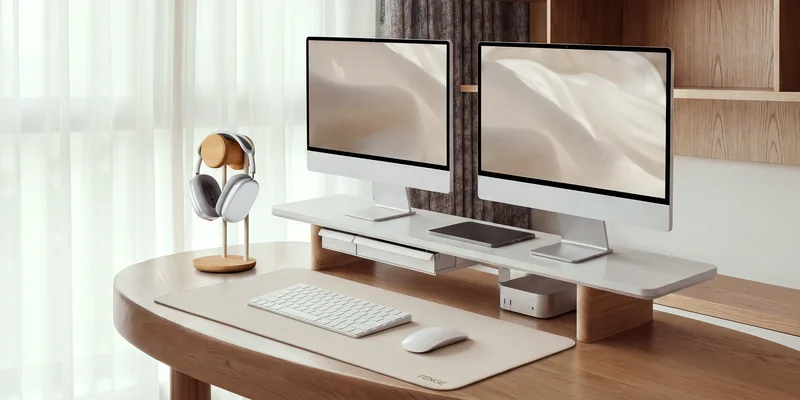
Sharing a computer desk with other people can make it difficult to keep the workspace clean and organized. One person may leave papers behind, while another might move the keyboard, charger, or other accessories. Over time, these small things can turn the desk into a cluttered space.
The key is to give everything a proper place and make sure everyone follows the same basic arrangement. Here are some practical ways to organize a shared computer desk and keep it tidy.
1. Clear the Desk and Sort Everything
Start by removing everything from the desk so you can see how much space you have. Sort the items into three groups: personal belongings, shared supplies, and things you no longer need.
Remove unnecessary items and put personal belongings aside. Keep frequently used supplies, such as keyboards, mice, and notebooks, within reach. Items that are rarely needed can go into a drawer or storage box.
This gives you a clean starting point and makes it easier to decide where everything should go.
2. Give Everyone a Dedicated Space
When multiple people use the same desk, it helps to assign each person a specific area. This prevents personal belongings and work materials from getting mixed up.
For example, if two people share a long desk, each person can have one side for their keyboard, mouse, notebook, and other accessories. If the desk is small, you can use simple desk dividers or organizers to separate their belongings.
Also, make sure everyone knows which items are shared and which belong to individual users. This reduces confusion and keeps the workspace organized.
3. Organize Shared Supplies
Shared supplies can quickly create clutter when everyone leaves them wherever they last used them. Pens, notebooks, sticky notes, USB drives, and chargers can easily spread across the desk.
Use a desk organizer or a small storage box to keep these items together. You can also use separate compartments for different supplies. For example, keep pens and pencils in one section and charging accessories in another.
If several people use similar items, label the storage compartments so everyone knows where to find and return them.
4. Manage Cables and Charging Accessories
Loose cables can take up desk space and make the workspace look untidy. They can also get tangled when multiple people use different devices and chargers.
Use cable clips to keep wires attached to the back or underside of the desk. Cable ties and sleeves can also help group several wires together. If people use similar chargers, label them to avoid mixing them up.
You can also attach a power strip underneath the desk. This keeps charging connections accessible without taking up space on the work surface.
5. Make Room for Each Person’s Devices
Computers, monitors, keyboards, mice, and other accessories can quickly overcrowd a shared desk. Arrange these devices carefully so everyone has enough room to work.
If you use laptops, consider adding laptop stands to free up some desk space. Monitor risers can also create extra room underneath for keyboards, notebooks, or small accessories.
Give each person a designated spot for their keyboard, mouse, and headphones. When someone finishes using the desk, they should return these items to their assigned places. Store devices that are not currently needed instead of leaving everything on the desk.
6. Use Vertical Space for Extra Storage
If your shared desk has limited surface space, use the walls and areas above it for additional storage.
You can install a small shelf to hold books, notebooks, and other supplies. A pegboard is another useful option for hanging headphones, cables, and lightweight accessories.
Wall-mounted organizers can also hold documents and stationery without taking up space on the desk. Keep frequently used items within easy reach and store less-used supplies on higher shelves.
7. Follow a Quick Daily Reset Routine
Even a well-organized desk can become messy if everyone leaves their belongings scattered around. A short cleaning routine at the end of the day can prevent clutter from building up.
Before leaving the desk, everyone should:
- Return shared supplies to their designated places.
- Remove personal belongings that are no longer needed.
- Put away notebooks, papers, and documents.
- Place keyboards, mice, and headphones in their assigned spots.
- Throw away rubbish and remove empty cups.
This routine only takes a few minutes but makes it easier for the next person to use the desk without having to clean up first.
Conclusion
Organizing a shared computer desk becomes easier when everyone has a designated space and knows where shared supplies belong. Use desk organizers, manage loose cables, and make better use of vertical storage to keep the workspace clear.
Also, encourage everyone to follow a quick daily reset routine. A few simple habits can prevent clutter from building up and make the desk more comfortable for everyone.
Frequently Asked Questions
1. How Long Should a Desk Be for Two People With Two Monitors Each?
A desk should ideally be 60 to 72 inches (152 to 183 cm) long for two people using two monitors each. A wider desk provides enough room for monitors, keyboards, mice, and other accessories without making the workspace feel crowded.
2. How do you keep a shared desk from getting messy?
Give everything a designated place and return items after use. A quick cleanup at the end of each day also helps prevent clutter.
3. What should you keep on a shared computer desk?
Keep essential items such as keyboards, mice, monitors, chargers, and frequently used stationery. Store less-used supplies in drawers or nearby storage.
4. How can you organize cables on a shared desk?
Use cable clips, ties, and sleeves to keep wires together. You can also label chargers and attach a power strip underneath the desk.
5. How much desk space does each person need?
Each person should have enough room for their computer, keyboard, mouse, and other frequently used items. The exact amount depends on the devices and type of work.


Leave a Reply